Every podcaster eventually hits the same wall: you record a great episode, but turning it into shareable video clips for social media eats up hours you don't have. Headliner is one of the tools built specifically to solve that, turning full-length audio or video episodes into captioned, platform-ready clips in a browser. I went through their site and pricing page in detail to see what's actually included.

What Is Headliner?
Headliner is a browser-based tool for promoting podcasts, radio shows, and blogs with video. It turns one full-length audio or video episode into multiple optimized, accessible podcast clips, complete with transcription, auto-captioning, and audiogram waveform animations — no separate video editor required.
Core Features
Clip & Caption Podcast Videos
Turn one full-length episode into up to 10 optimized, accessible podcast clips, automatically captioned and formatted for the platform you're posting to.
Transcribe & Simplify
Get an automatic transcription of your podcast alongside your video edits, cutting down the manual editing work per episode.
Upload to YouTube
Convert audio into video and publish full-length audiograms or short clips straight to YouTube.
Automatically Post to Social
Auto-post audiograms to social media every time you publish a new episode, so your reach isn't limited to a single platform.
Create On the Go
A mobile app lets you edit and share clips from anywhere, not just at a desktop.
Connect to Your Blog & API/Custom Solutions
The Disco widget dynamically recommends your podcast content to blog readers, and Headliner offers API and custom enterprise solutions for hosts and networks that need deeper customization.
Pricing
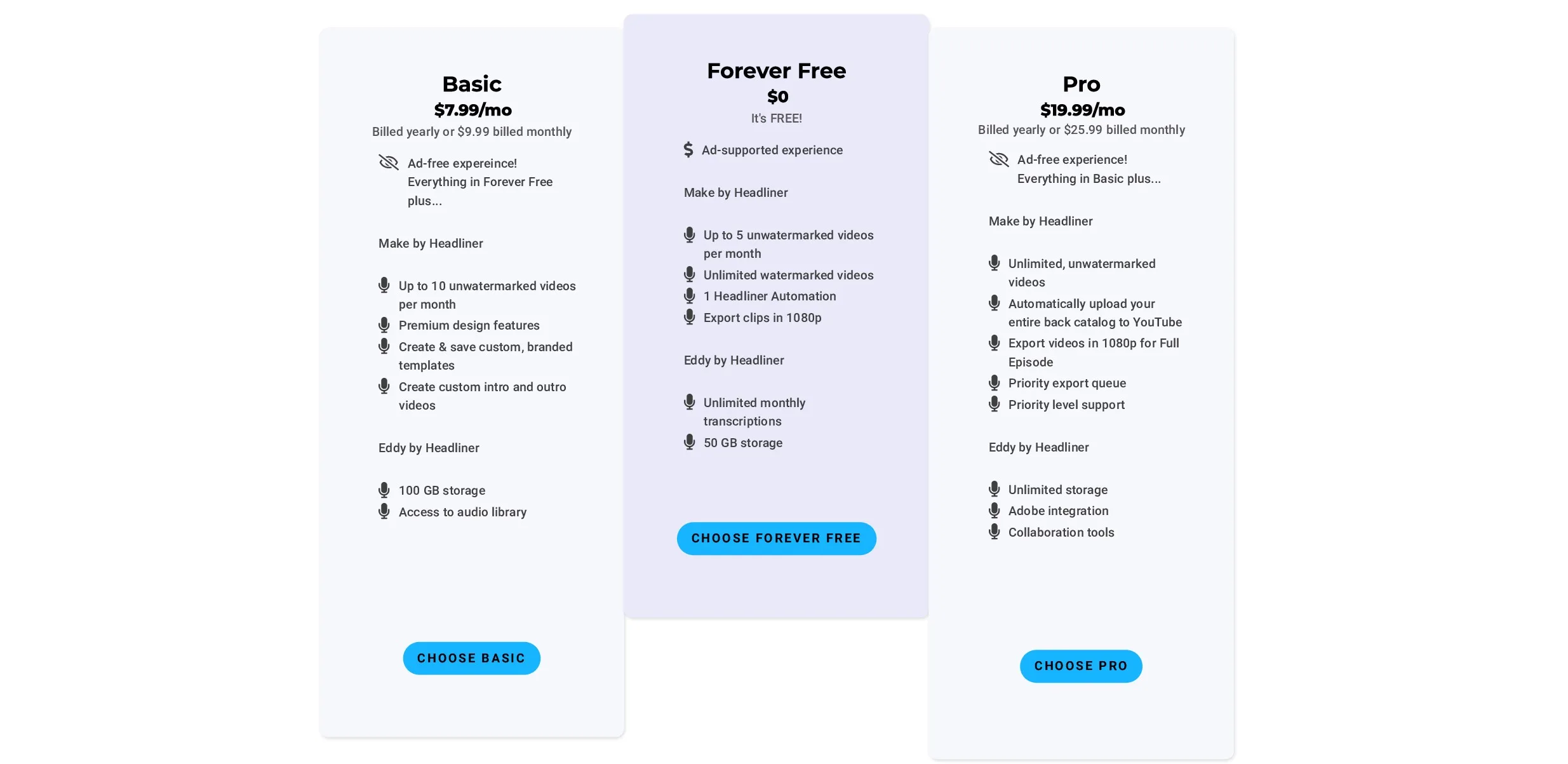
Headliner runs on a simple three-tier model, with up to 50% savings when billed annually instead of monthly:
- Forever Free — $0/month: ad-supported, unlimited free video clips and captioned clips, 1 unwatermarked audiogram/month (unlimited watermarked ones), 1080p resolution for videos up to 10 minutes, 10GB video uploads, 2-hour audio files, auto-create audiograms for 1 podcast, transcribe/edit full episodes (2 hours/month), and AI-generated show notes/social captions/keywords.
- Basic — $7.99/month (billed annually): everything in Free plus an ad-free experience, 10 unwatermarked audiograms/month, unlimited captions per month (10 min per project), auto-create audiograms for multiple podcasts, auto-post to social media and YouTube, branded templates, custom intro/outro videos, and custom fonts.
- Pro — $19.99/month (billed annually): everything in Basic plus unlimited, unwatermarked videos, unlimited transcription, custom watermarks, 1080p resolution for videos up to 2 hours, 4-hour audio files, full-episode transcription/editing with unlimited minutes, priority support, and the fastest video exports.
Headliner also offers free upgrades for qualifying education and nonprofit organizations, plus custom Enterprise/API solutions for podcast networks and larger publishers.
What Real Users Say
Direct quotes and mentions from podcasters using Headliner:
"Just received excellent customer service from @headliner.app. Thank you for making it easy to provide a good transcript for the Unpacking Peanuts podcast." — Unpacking Peanuts Podcast
"When you may think that no one is watching, you receive an email from one of your favorite apps telling you that you were chosen as this week's headliner highlight... We love your app!" — MAJ (R) Annette Whittenberger, Editor-in-Chief, Veteran Lifestyle Magazine
"In case #youtube is your jam - all our episodes are up there too! I used to do them all by myself but @headliner.app makes it so easy!" — Doomed to Fail podcast
Pros and Cons
Pros
- Genuinely usable free tier — unlimited video clips and captioned clips even without paying
- Turns one long episode into up to 10 platform-ready clips automatically, saving significant editing time
- Auto-posts to social media and YouTube on publish, so distribution doesn't require manual uploads everywhere
- Browser-based — no separate video editing software to install or learn
- Free upgrade path for qualifying education and nonprofit organizations
- Affordable paid tiers ($7.99–$19.99/mo) compared to hiring a video editor per episode
Cons
- Free tier is ad-supported and limited to 1 unwatermarked audiogram per month
- Longer audio files (beyond 2–4 hours) and higher-resolution long-form video need the Pro tier
- Full unlimited, unwatermarked video output requires the $19.99/month Pro plan
FAQ
How much does Headliner cost?
Headliner has a free forever plan, then Basic at $7.99/month and Pro at $19.99/month (both billed annually), with up to 50% savings versus monthly billing.
Is video creation really free?
Yes — the Forever Free plan includes unlimited video clips and captioned clips, though it's ad-supported and limits unwatermarked audiograms to 1 per month.
What does Headliner's transcription cover?
All plans include transcription; free accounts get 2 hours per month of full-episode transcribe/edit, while Pro includes unlimited-minute full-episode transcription and editing.
Can Headliner auto-post new episodes to social media?
Yes, on the Basic and Pro tiers, Headliner can auto-create audiograms and auto-post to social media and YouTube whenever you publish a new episode.
Does Headliner offer nonprofit or education discounts?
Yes, qualifying education and nonprofit organizations can apply for a free upgrade through Headliner's dedicated form.
Final Verdict
Headliner earns its place in a podcaster's toolkit by making the most tedious part of podcast marketing — turning long episodes into shareable clips — genuinely simple, with a free tier generous enough to actually use rather than just a trial gate. If you're publishing episodes regularly and still manually clipping and captioning videos, the Basic or Pro tier pays for itself quickly in saved editing time and wider reach.
Try Headliner's podcast video clipping tool free →
#Headliner #PodcastMarketing #VideoClips #PodcastGrowth #ContentRepurposing #SocialMediaVideo