When it comes to managing social media, I often feel overwhelmed by the sheer number of platforms and the constant need for fresh content. I used to spend hours trying to strategically decide when and what to post. Then I discovered Hopper Hq, a tool that promises to simplify the process of planning and scheduling social posts across multiple channels. With its claim that I could schedule a week’s worth of posts in just 10 minutes, I knew I had to give it a try.
Hopper Hq is designed for users who want to efficiently manage their social media presence without the headache of juggling various platforms. It allows you to schedule posts for Instagram, TikTok, LinkedIn, Facebook, YouTube, X, and Pinterest, which is particularly appealing to both individuals and businesses alike. I was intrigued by the promise of a 14-day free trial, which let me explore its features without any commitment. After diving into it, I found that there’s a lot more to this platform than meets the eye.
First Impressions
Upon visiting the Hopper Hq homepage, I was greeted with a clean and user-friendly interface. The design is intuitive, making it easy to understand how to navigate the platform. The first thing that struck me was the emphasis on efficiency; from the layout, it was obvious that this tool was built for speed and usability. There were clear prompts to start scheduling posts, and I was intrigued by the promise of being able to save time while enhancing my social media strategy.
As I set up my account, I appreciated the straightforward onboarding process. The 14-day free trial made it easy to explore all the features without feeling pressured to commit immediately. I quickly connected my social media accounts, which was a seamless process. There’s no doubt that the developers focused on user experience, and I felt confident diving in.

Quality and What You Get
Hopper Hq offers a comprehensive suite of features that cater to anyone looking to enhance their social media strategy. The ability to schedule posts across a variety of platforms is undoubtedly a standout feature. The visual content calendar allows for easy planning so you can see your posts at a glance. You can upload images and videos directly, and the tool also supports bulk uploads, which is a game-changer if you have a lot of content to share.
Another quality aspect is the analytics features that provide insights into how your posts are performing. This can be incredibly valuable for anyone looking to improve their social media strategy. They offer reporting tools that help measure engagement, which can guide future content decisions.

Real-World Experience
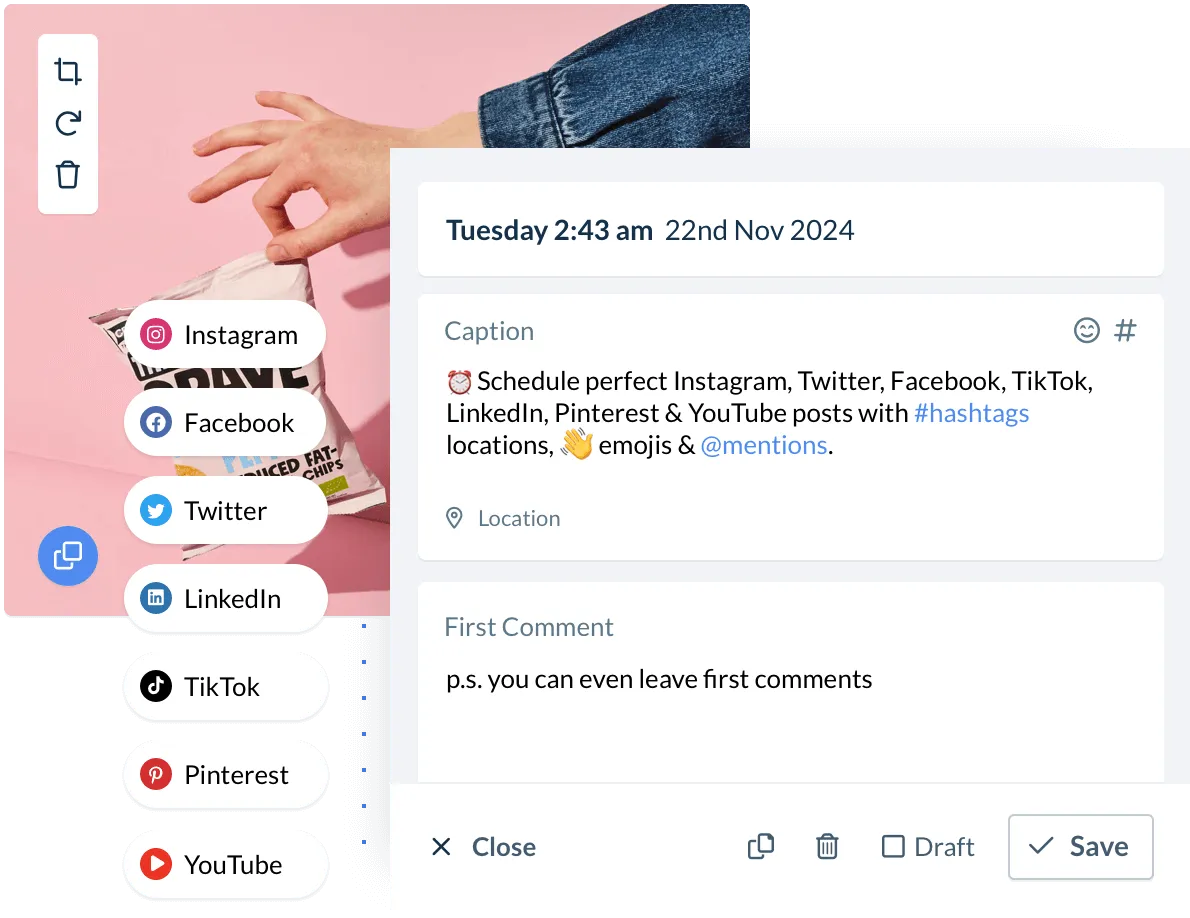
In practice, I found scheduling posts to be quite simple. I was able to drag and drop content into my calendar, and the tool provided suggested posting times based on audience engagement metrics. This feature significantly streamlined my planning process, as I could quickly fill my calendar with content while also optimizing for the best times to post.
One of the most beneficial features I utilized was the option to preview how my posts would appear on each platform. This not only ensured that everything looked great but also allowed me to tweak captions and visuals accordingly. The ability to schedule posts for multiple platforms simultaneously was a huge time-saver, enabling me to maintain a consistent presence without the hassle of logging into each account separately.
.webp)
How It Compares to Alternatives
While there are many tools available for social media management, Hopper Hq stands out for its simplicity and focus on strategic scheduling. Compared to competitors, such as Hootsuite and Buffer, Hopper Hq offers a more visually appealing and user-friendly approach. Some alternatives can feel clunky or overloaded with features, which can be daunting for new users. Hopper Hq’s streamlined design and ease of use cater particularly well to those who may not be as tech-savvy.
However, some of the more established platforms do offer a wider array of functionalities, particularly in terms of advanced analytics and integrations. If you require a deep dive into metrics and performance tracking, you might find some limitations with Hopper Hq. Nevertheless, for many users, its comprehensive scheduling and planning capabilities are more than enough.

Pros and Cons
- Easy-to-use interface: Intuitive design that simplifies scheduling.
- Multi-platform support: Schedule posts for Instagram, TikTok, LinkedIn, Facebook, YouTube, X, and Pinterest.
- Bulk uploads: Efficiently upload multiple pieces of content at once.
- Content previews: See how posts will look on different platforms before publishing.
- Analytics tools: Gain insights into post performance and audience engagement.
- 14-day free trial: Test out the platform without any commitment.
- Limited advanced analytics: May not satisfy users needing in-depth metrics.
- Less comprehensive integration: Fewer advanced integrations than some alternatives.
- Learning curve for advanced features: While user-friendly, some features may require a little time to master.
Price and How to Get the Best Deal
Although specific pricing details were not provided, it's noteworthy that Hopper Hq offers a free 14-day trial. This allows users to explore its features before committing to a paid plan. I recommend signing up during promotional periods when there may be discounts or special offers.
For those who find that Hopper Hq meets their needs, it’s worth investing in a subscription, especially considering the time-saving benefits it provides. The best way to secure the most value is to take full advantage of the trial period and evaluate how much time and effort it saves in your social media management.
Tips
- Start with a content calendar: Plan your content ahead of time to maximize the efficiency of the tool.
- Utilize analytics: Regularly check performance metrics to refine your social media strategy based on engagement.
- Explore all features: Take time to familiarize yourself with all available tools, including bulk uploads and scheduling suggestions.
- Schedule in batches: Dedicate a specific time each week to batch schedule your posts for maximum productivity.
- Stay flexible: Be ready to adjust your posts based on real-time trends and audience feedback.
Who This Is Best For
Hopper Hq is ideal for small business owners, marketers, and social media managers looking for an efficient way to schedule and manage their posts across various platforms. It’s particularly suitable for those who value time-saving tools that do not compromise on quality. If you’re someone who struggles with keeping a consistent online presence or simply wants to streamline your social media planning process, this tool may be a great fit for you.
FAQ
- Is there a free trial? Yes, Hopper Hq offers a 14-day free trial with no commitment required.
- Can I schedule posts for multiple platforms? Absolutely! You can schedule posts for Instagram, TikTok, LinkedIn, Facebook, YouTube, X, and Pinterest.
- How does Hopper Hq help with post performance? The platform provides analytics to track engagement and optimize your posting strategy.
- Can I bulk upload content? Yes, Hopper Hq allows you to upload multiple images and videos at once.
- Is it user-friendly for beginners? Yes, the platform is designed to be intuitive and easy to learn for users of all skill levels.
Final Verdict
Overall, I found Hopper Hq to be an invaluable asset in my social media management toolkit. Its user-friendly interface, multi-platform scheduling, and analytics capabilities provide a comprehensive solution for anyone looking to enhance their online presence. The 14-day free trial is a great opportunity to explore its features without commitment, making it an attractive option for curious users.
If you’re feeling bogged down by the complexities of social media management, I encourage you to give Hopper Hq a try. It just might be the solution you’ve been searching for to simplify your process and elevate your social media game.
Check today's price and current deals at Hopper Hq

See the latest Hopper Hq coupons and offers here
Shop Hopper Hq now before this deal changes
#HopperHqReview #HopperHqCouponCode #HopperHqDiscount #BestPriceHopperHq #HopperHqDeals #HopperHqSocialMediaScheduler #HopperHqFeatures #HopperHqTrial #HopperHqAlternatives #HopperHqSchedulingTool #HopperHq #HopperHqPromoCode




