I send newsletters regularly and I’ve always hated the trade-off: either wrestle with raw HTML or get locked into a bloated all-in-one email platform. Publicate promised a middle path — a drag-and-drop email builder that exports clean HTML and publishes to whatever provider I already use. After building several real newsletters with it, here’s my honest, first-person review.

1. What Is Publicate?
Publicate is an HTML email and newsletter builder that lets you design polished newsletters in minutes without writing any code. You build with a visual editor, pull in content from a huge library of images and integrations, then export or publish to 57+ email providers — including Outlook and Gmail. It’s used by teams at recognisable brands, and its whole pitch is speed and portability rather than locking you into one sending platform.
2. Who Is Publicate Best For?
✅ Marketers who switch between email providers
Because Publicate exports clean HTML and works with 57+ providers, you’re not tied to one sender. If you build in one tool but send from Mailchimp, Outlook, or Gmail, this is ideal.
✅ Small teams and agencies producing lots of newsletters
Reusable saved content modules, a brand kit, and 300+ templates make repeat production fast — exactly what agencies and busy internal comms teams need.
✅ Non-designers who want professional results
With 2 million+ free images, GIFs and icons plus ready-made templates, you can get a great-looking newsletter without design skills.
❌ Solo hobbyists on a zero budget
There’s a free trial, but ongoing use is paid. If you send the occasional free personal update, a fully free tool may suit you better.
❌ People who need a full sending/CRM platform
Publicate builds and publishes newsletters; it isn’t a full email-marketing suite with heavy automation and CRM. If that’s what you need, pair it with (or choose) a dedicated ESP.
3. Core Features Breakdown
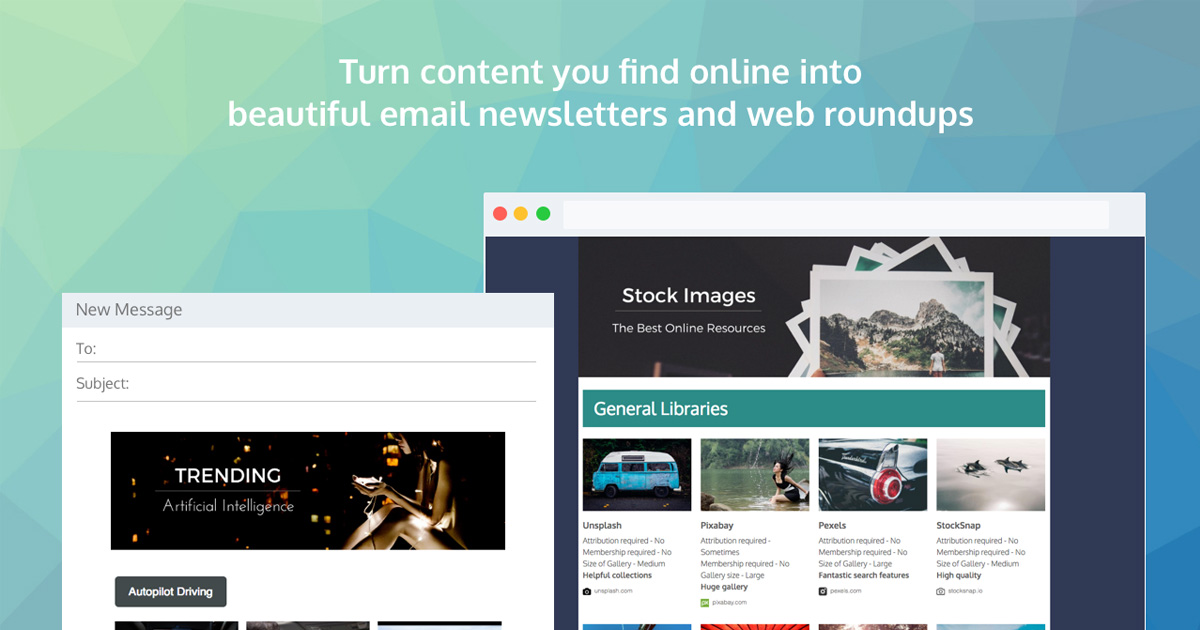
3.1 Drag-and-Drop Email Builder
The core editor lets you assemble newsletters visually and export without touching code — the fastest part of the workflow.
3.2 Content Library & Integrations
Access 2 million+ free images, GIFs, stickers and icons, plus integrations like Canva and Slack, so you can pull content in without leaving the builder.
3.3 Templates & Reusable Modules
300+ ready-to-use templates and saved reusable content modules mean you never start from scratch and can keep branding consistent.
3.4 Publish Anywhere
Publish integrations cover Outlook, Gmail and 57+ email providers, so the same newsletter can go out through whatever platform you already use.
4. Pricing
Publicate offers a free trial (no credit card required), then paid tiers billed monthly or annually (save ~17% annually):
Individual — $16/mo ($190 billed annually): 1 individual workspace, unlimited newsletters, content library, 300+ templates, 10 reusable modules, publish integrations, works with 57+ providers, basic analytics.
Individual Plus — $24/mo ($290 annually): everything in Individual plus brand kit, remove Publicate logo, custom fonts, 30 reusable modules, all integrations, custom domains, password-protect.
Higher team/business tiers are also available at roughly $41/mo ($490 annually) and $58/mo ($690 annually). Always confirm current pricing and tier limits on the official site before subscribing.
5. Pros & Cons
Pros: Fast drag-and-drop building; exports clean HTML with no coding; huge free content library; 300+ templates; works with 57+ email providers so you’re not locked in; free trial without a credit card.
Cons: It’s a builder, not a full ESP with deep automation/CRM; ongoing use is paid; the logo removal and brand kit sit behind the higher Individual Plus tier.
6. Publicate vs Beefree
Beefree is the best-known standalone email builder and a natural comparison. Both export HTML and focus on design speed. Publicate leans hard into its content library (2M+ assets, Canva/Slack integrations) and its publish-to-57+-providers workflow, which makes it feel more like a build-and-ship hub. Beefree has a very mature editor and a generous free tier. If a free forever tier is your top priority, weigh Beefree; if you value the built-in content library and one-click publishing across many providers, Publicate is the stronger fit.
7. Final Verdict: Is Publicate Worth It in 2026?
For anyone who builds newsletters regularly and wants to stay provider-agnostic, Publicate is genuinely worth it. The editor is quick, the content library saves real time, and being able to publish to 57+ providers means you’re never trapped. It’s not a full marketing suite, and the best branding features need the Plus tier, but at $16/mo for the entry plan it’s reasonably priced for the speed it delivers. Start with the free trial and see if it fits your workflow before committing.
Frequently Asked Questions
Does Publicate require coding?
No. You build visually and export clean HTML without writing any code.
Which email providers does Publicate work with?
It publishes to 57+ email providers, including Outlook and Gmail, and integrates with tools like Canva and Slack.
Is there a free version of Publicate?
There’s a free trial with no credit card required. Ongoing use is on paid tiers starting at $16/mo (Individual).
Can I remove the Publicate logo?
Yes — logo removal, custom fonts, and a brand kit are included from the Individual Plus tier ($24/mo).
Is Publicate a full email marketing platform?
No. It’s a newsletter builder and publisher rather than a full ESP with heavy automation and CRM. Many users pair it with their existing sending platform.
👉 Where to Get Publicate
You can start a free trial and build your first newsletter here: Try Publicate.
Affiliate disclosure: This post contains an affiliate link. If you sign up through it, I may earn a commission at no extra cost to you. All opinions are my own based on hands-on use.