I make long-form videos and podcasts, and turning them into short clips for TikTok, Reels and Shorts used to eat my entire week. So when quso.ai (formerly vidyo.ai) promised to do it “in minutes, not hours,” I had to test it on my own footage. Here’s my honest review.
1. What Is Quso.ai?
Quso.ai is an all-in-one AI video and social media platform that finds the best moments in any long video, podcast or stream and turns them into short, captioned clips ready for TikTok, Reels and Shorts. Originally vidyo.ai, it has grown into a full suite: AI clipping, AI captions, a text-based video editor, a brand kit, and a social media scheduler — with 4M+ users worldwide.
2. Who Is Quso.ai Best For?
✅ You’ll Love Quso.ai If…
You’re a podcaster, YouTuber, course creator, coach or marketer sitting on long-form content you want to repurpose at scale. If you publish regularly and want clips, captions and scheduling in one dashboard instead of paying for five separate tools, this is squarely aimed at you.
❌ Quso.ai Might Not Be For You If…
You don’t produce long-form video, or you need frame-perfect, cinematic edits with full manual control — AI clipping is fast but still benefits from human polish. Pure short-form creators who never start from long content won’t get the core value.
3. Core Features Breakdown
3.1 AI Video Clipping (Intelliclips)
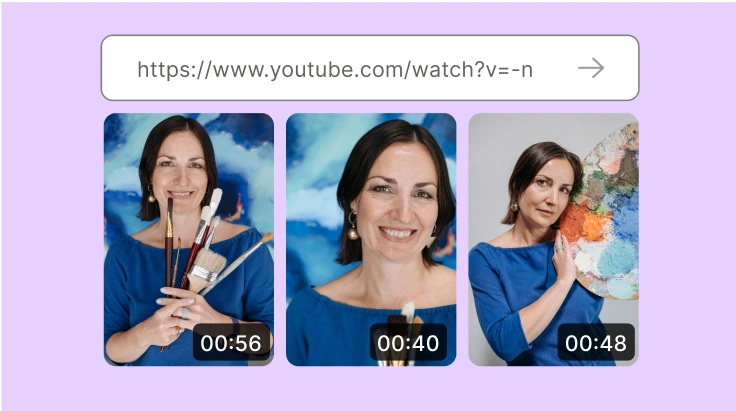
The flagship. Paste a YouTube link or upload up to 15GB, and quso.ai’s AI finds the best moments and generates short clips automatically. Users report making hundreds of clips in days. You can also use Custom Clips for timestamp/transcript control when you want precision.
3.2 AI Captions & Text-Based Editor
It auto-generates trendy subtitle styles and lets you edit video like a doc — add logos, fonts, B-roll and music with a click. Cutmagic handles scene detection and AI filler-word removal kills the “umms” automatically. Subtitles support up to 100 languages.
3.3 Social Media Scheduler & Planner
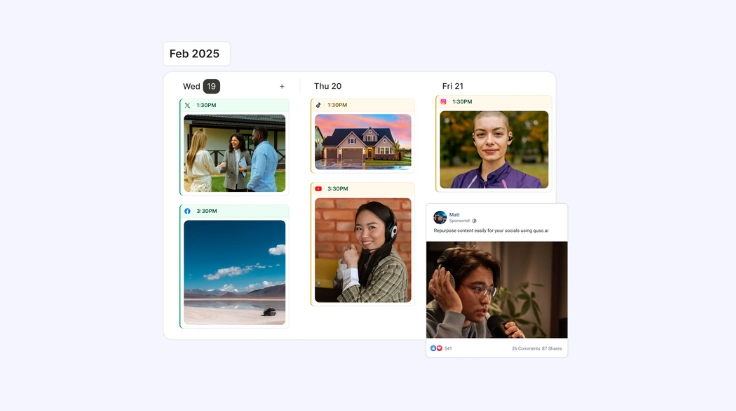
Schedule and manage content across 7 social platforms in a few clicks, with an AI content planner (no more spreadsheets) and integrated analytics to track growth. This is what makes it a true all-in-one rather than just a clipper.

3.4 AI Social Captions & Brand Kit
One button generates endless engaging captions, trending hashtags and descriptions in your brand voice, while the brand kit keeps fonts, colors and logos consistent across every clip and post.
4. Quso.ai Pricing
Quso.ai offers a free trial with limited credits (no credit card required) so you can test it before paying. The paid plan headlines at $49/month, and the site frames that against roughly $451/mo you’d otherwise spend stacking separate tools (Opus Clip for clipping, Buffer/Hootsuite for scheduling, Veed/Descript for editing, Repurpose.io, etc.). Credits and tiers scale with usage, so check the current plan that matches your volume.
5. Pros & Cons
✅ Pros
- Genuinely fast — long video to captioned clips in minutes.
- All-in-one: clipping, editing, captions, scheduling, analytics.
- Replaces ~$451/mo of separate tools for $49/mo.
- Beginner-friendly, intuitive interface.
- Free trial with no credit card.
❌ Cons
- AI clip selection still needs a human eye for the best results.
- Credit limits can bite heavy users on lower tiers.
- Only valuable if you create long-form content.
- Not for cinematic, fully manual editing workflows.
6. Quso.ai vs Opus Clip
Opus Clip is the best-known AI clipper and excellent at virality scoring, but it’s focused on clipping. Quso.ai’s edge is being a complete suite — clipping plus a real video editor, brand kit, captions, and a 7-platform scheduler with analytics in one place. If all you want is the single best clipper, Opus is a strong pick; if you want to clip, edit, caption and publish without juggling subscriptions, quso.ai delivers more for the money.
7. Final Verdict: Is Quso.ai Worth It in 2026?
My verdict: yes, for any serious long-form creator. The time savings are real — what took me hours now takes minutes — and bundling editing and scheduling at $49/mo undercuts a stack of single-purpose tools dramatically. Treat the AI’s clip picks as a fast first pass and tweak the winners, and you’ll get enormous leverage. With a free trial and no card required, there’s no reason not to run your next video through it.
Frequently Asked Questions
Is vidyo.ai now quso.ai?
Yes — vidyo.ai is now part of quso.ai, which has expanded from clipping into a complete social media AI suite for content, scheduling, analytics and editing.
Can I use quso.ai for free?
Yes. There’s a free trial with limited credits so you can test the tool before committing.
What can I upload?
Import from YouTube or upload mp4, m4v, mov and webm files up to 15GB. AI clipping supports 20 languages and subtitles support 100.
Who is quso.ai for?
Podcasters, YouTubers, educators and business owners with long-form video who want to repurpose it into short clips and publish across platforms.
Where to Get Quso.ai
Want to turn your long videos into a stream of viral clips? Start free here: Try quso.ai →
Affiliate disclosure: This post contains affiliate links. If you sign up through them, I may earn a commission at no extra cost to you. I only recommend tools I have actually tested.