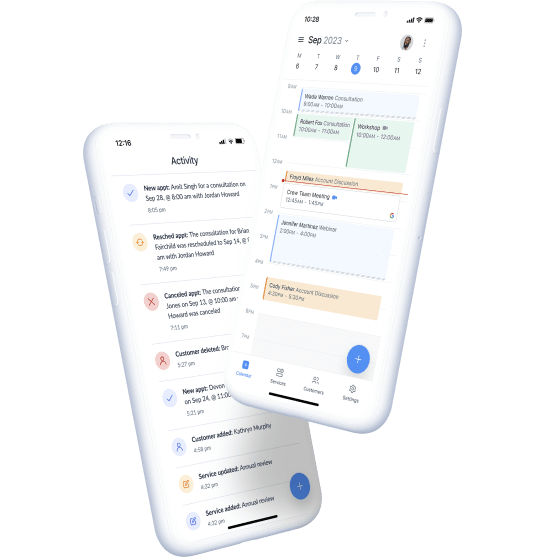
Juggling appointment bookings through phone calls, texts, and a paper calendar is a fast way to lose customers to no-shows and double bookings. I went straight to Setmore's homepage and pricing section to see what its free scheduling software actually includes, and where the paid tiers kick in.
What Is Setmore?
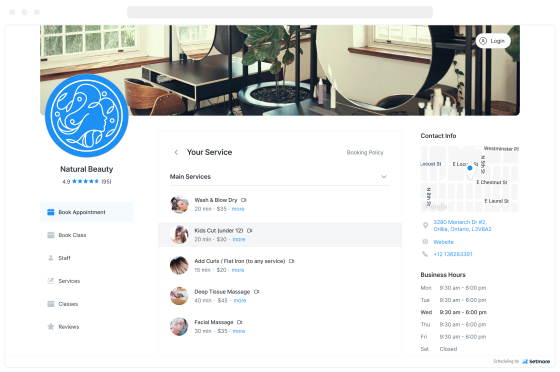
Setmore is free online appointment scheduling software built around a customizable Booking Page: a branded page where customers can self-book appointments 24/7 that syncs directly into your calendar. Its homepage highlights core capabilities like automated online booking, reminders, and payments, positioned for service-based businesses that want to cut down on missed appointments and manual scheduling back-and-forth.
Key Features (as listed on their homepage)
- Branded Booking Page — a custom page showing your services and real-time availability, brandable with your logo and business details so customers can self-book at their convenience
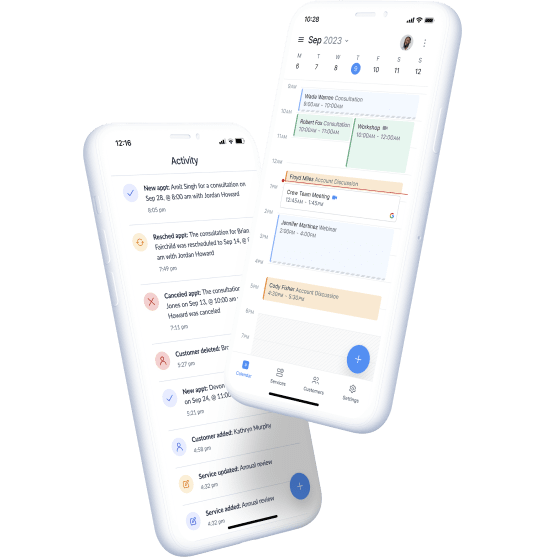
- Calendar sync — share your Booking Page and every new appointment lands directly in your calendar; Pro adds 2-way calendar sync
- Video meeting integration — add 1-click Zoom or Google Meet links to appointments to reach customers remotely
- Online payments — accept payments in advance so you're not chasing invoices after the fact
- No-show reduction — automated personalized email or text reminders sent to every customer
- Branded Mobile App & iOS/Android apps — available on both the Free and Pro plans
- Team collaboration tools and integrations with other leading business apps
Pricing (as listed on their pricing section)
- Free — $0/user/month: up to 4 users, 200 appointments, 24/7 human support, accept payments, Branded Booking Page, Branded Mobile App, email reminders, email confirmations, integrations with leading apps, iOS and Android apps, team collaboration tools
- Pro — $5/user/month (annual billing): unlimited users, unlimited appointments, everything in Free plus SMS & email reminders, recurring appointments, 2-way calendar sync, ability to remove Setmore branding, block customers, Google Reviews integration, custom notifications & reminders, priority support, and Setmore states it donates 1% to plant trees
- Team — $5/user/month is also referenced on the pricing widget alongside Free and Pro
- Larger organizations can contact Setmore directly to build a custom all-in-one booking system
Note: the pricing widget lists the Pro rate under annual billing — confirm current monthly-vs-annual pricing directly on their live pricing page, since promotional rates can change.
Customer Feedback (from their homepage)
"Highly recommend Setmore to anyone. I must have tried a zillion apps and you can trust me that this is the best!" — Sruthi Ravindran
Pros and Cons
Pros
- Genuinely usable free tier — up to 4 users and 200 appointments with a branded booking page, payments, and mobile apps, not just a stripped-down trial
- Entry-level Pro plan at $5/user/month unlocks unlimited users and unlimited appointments, which is inexpensive for growing teams
- Built-in video meeting links (Zoom/Google Meet) and online payment acceptance reduce the need for separate tools
- Automated SMS/email reminders directly address the no-show problem that costs service businesses revenue
- iOS and Android apps included even on the free plan
Cons
- SMS reminders, 2-way calendar sync, and removing Setmore branding are locked behind the paid Pro plan
- The free plan caps out at 200 appointments and 4 users, which may not suit larger or high-volume teams
- Exact monthly (non-annual) Pro pricing isn't fully broken out on the homepage widget — confirm billing terms at checkout
- Enterprise/larger-organization pricing isn't published and requires contacting sales
FAQ
Is Setmore really free?
Yes — the Free plan supports up to 4 users and 200 appointments with a branded booking page, payments, and mobile apps at $0/month.
What does the Pro plan add?
Unlimited users and appointments, SMS reminders, 2-way calendar sync, removal of Setmore branding, Google Reviews integration, and priority support, starting at $5/user/month billed annually.
Can customers book appointments themselves?
Yes — Setmore's core feature is a Branded Booking Page where customers can self-book 24/7, with appointments syncing straight to your calendar.
Does Setmore support online payments and video calls?
Yes, both the Free and Pro plans list support for accepting payments, and the homepage highlights 1-click Zoom or Google Meet video meeting links.
Final Verdict
Setmore stands out for offering a genuinely functional free scheduling plan rather than a bare-bones trial, then scaling affordably to $5/user/month for unlimited users and appointments plus SMS reminders and deeper calendar sync. For solo service providers or small teams that need a branded booking page, payment collection, and automated reminders without a big software bill, it's worth trying the free tier first before deciding whether Pro's extra features are worth the upgrade.
Start scheduling free with Setmore →
#Setmore #AppointmentScheduling #BookingSoftware #SmallBusinessTools #SaaS #OnlineBooking