Every time someone on my small team emails a client with a plain, inconsistent signature, it bugs me. So I tested SyncSignature, an email signature generator and management tool that 40,000+ professionals reportedly use, to see if it could finally standardize ours. Here’s my honest review.

1. What Is SyncSignature?
SyncSignature is an email signature generator and management platform for Gmail, Outlook and Apple Mail. You can create professional signatures in minutes, add banners and buttons, and — on team plans — auto-install and manage signatures across Google Workspace and Microsoft 365. It scales from a single individual to whole companies that need consistent, branded signatures.
2. Who Is SyncSignature Best For?
✅ Solopreneurs and freelancers
The free and Solo tiers let you build a polished, branded signature without design skills.
✅ Small teams wanting consistency
Bulk creation and auto-install keep everyone’s signature on-brand automatically.
✅ Marketers running signature campaigns
Banners, buttons and signature analytics turn every email into a marketing touchpoint.
❌ People who never customize their signature
If a one-line name is all you want, your email client’s built-in signature is enough.
❌ Enterprises needing niche compliance signatures
Highly regulated legal disclaimers at scale may need a specialized enterprise vendor.
3. Core Features Breakdown
3.1 Signature Generator
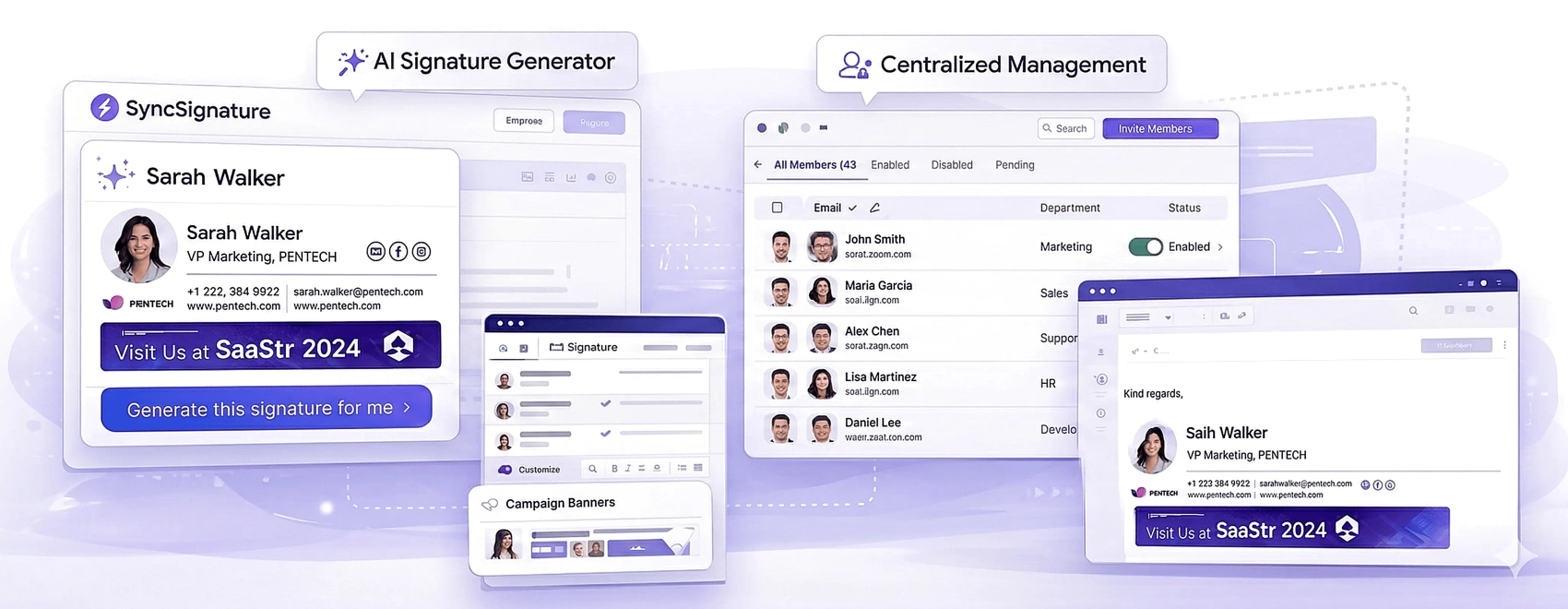
Create professional signatures in minutes with PRO templates, a profile-picture maker and unlimited edits.
3.2 Banners, Buttons & Analytics
Add clickable banners and CTA buttons, then track engagement with signature analytics.
3.3 Team Management & Auto-Install
Auto-install for Google Workspace and Microsoft 365, bulk signature creation and department-wise signatures.
3.4 Multi-Client Support
Works with Gmail, Outlook and Apple Mail, with copy/paste and share-via-email options.
4. Pricing
SyncSignature has a free option to create a signature. The Solo plan is $6/month (billed annually) for one individual, removing SyncSignature branding and unlocking PRO templates, analytics, banners and unlimited edits. The Team plan is $10/month total (about $2/user, billed annually) for 5 users, adding auto-install for Google Workspace and Microsoft 365, bulk signatures and advanced editing, with a free trial. Confirm current pricing on the official site.
5. Pros & Cons
Pros: free tier, very affordable paid plans, works with Gmail/Outlook/Apple Mail, auto-install for Workspace & 365, banners and analytics.
Cons: best value requires annual billing, advanced features gated to Team plan, enterprise compliance needs may exceed its scope.
6. SyncSignature vs WiseStamp
WiseStamp is a long-established signature tool, but SyncSignature undercuts it on price (Solo from $6/mo) and includes auto-install for Workspace and 365 on affordable team plans. For cost-conscious teams that want central management, SyncSignature is a strong value pick.
7. Final Verdict: Is SyncSignature Worth It in 2026?
For individuals and small teams, yes. It’s one of the most affordable ways to get consistent, branded, trackable email signatures, and the free tier plus free team trial make it easy to test. Enterprises with heavy compliance needs might look elsewhere, but for most small businesses SyncSignature nails the job.
Frequently Asked Questions
Is SyncSignature free?
Yes, there’s a free option to create a signature; paid plans unlock branding removal and pro features.
How much does SyncSignature cost?
Solo is $6/month and Team is $10/month (about $2/user) for 5 users, both billed annually.
Which email clients does it support?
Gmail, Outlook and Apple Mail, with auto-install for Google Workspace and Microsoft 365 on team plans.
Can I manage a whole team’s signatures?
Yes — bulk creation, auto-install and department-wise signatures are on the Team plan.
Does it track engagement?
Yes, signature analytics and clickable banners/buttons are included.
👉 Where to Get SyncSignature
You can create a signature free with SyncSignature here: Visit SyncSignature.
Disclosure: This post contains an affiliate link. If you sign up through it, I may earn a commission at no extra cost to you.