Lesson planning eats up more teacher time than almost anything else, so I went straight to Chalkie, an AI tool that promises to create classroom-ready lessons, worksheets, and activities in seconds, to see if it holds up. Here's what I found exploring the live site, including its real pricing page.

What Is Chalkie?
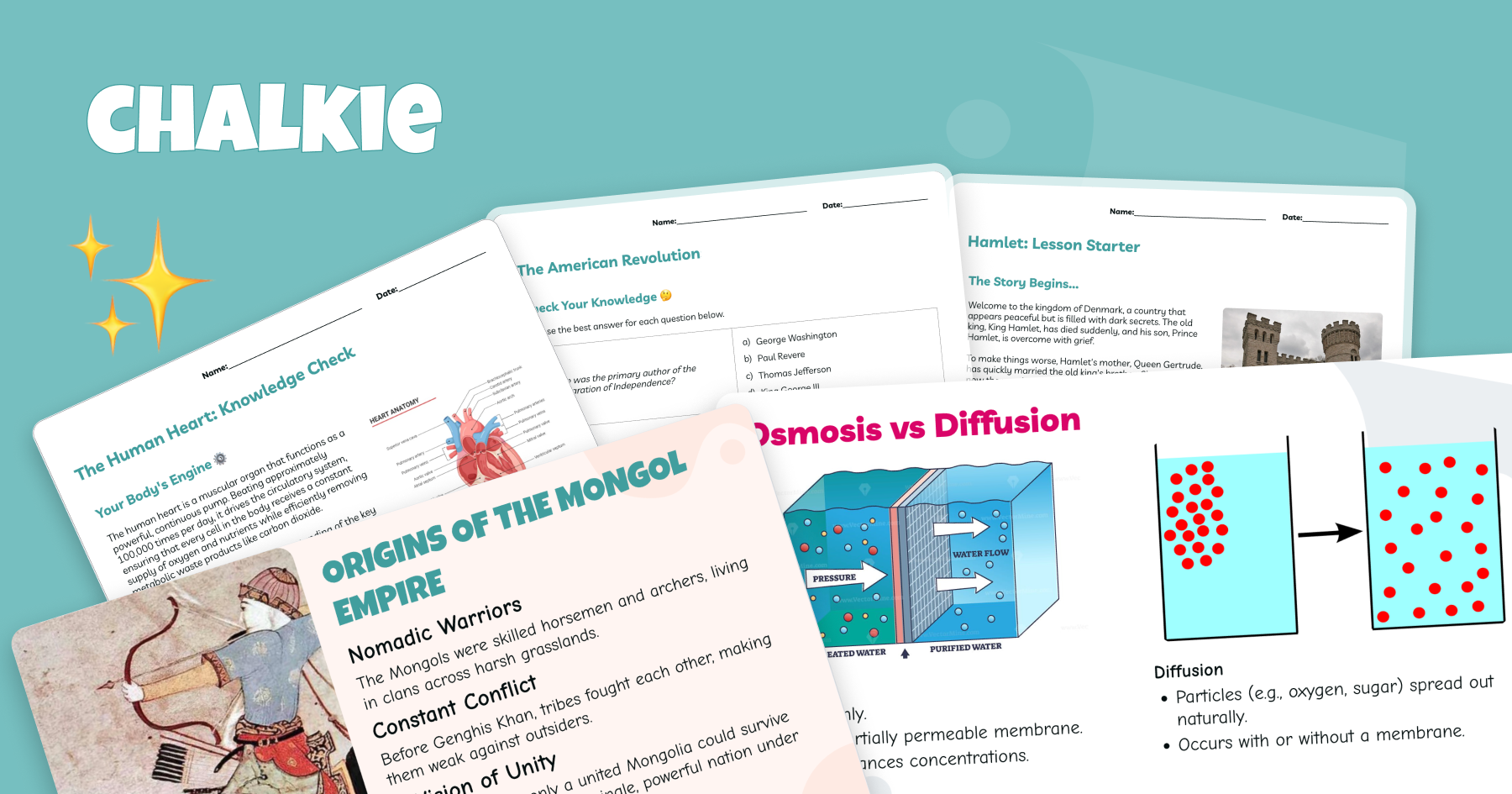
Chalkie describes itself as an AI tool for teachers with the tagline "Lessons in seconds — Learning materials designed by you and generated by AI." The site states it helps teachers create "fun, accurate, and classroom-ready slides" that instantly align to Common Core or specific state standards. Chalkie says it has helped "1,000,000+ teachers" across "100+ countries" in "40 languages," positioning itself as a tool "designed with teachers for teachers" to give educators back time to focus on what matters — "inspiring children in the classroom."
Key Features I Noticed
AI Lesson Plan Generator
Create fun, accurate, and classroom-ready slides that instantly align to Common Core or your specific state standards, turning a topic and grade level into a usable lesson deck in seconds.
Lesson Series
For teachers planning an entire unit, Chalkie can create an ordered series of lessons on complex topics, complete with recaps and quizzes built in, rather than requiring you to plan each session separately.
AI Worksheet & Activity Generator
Generate engaging activity sheets to go with your lessons, ready to share, export, or print directly for classroom use.
Standards Alignment
Paid plans add the ability to align generated content to curriculum and specific state standards, which matters for teachers who need to document standards coverage.
Export to Google & Microsoft
Even the free plan includes exporting your created lessons and activities directly to Google and Microsoft formats, so materials fit into whatever ecosystem your school already uses.
Custom Themes and Branding Removal
Higher tiers let you remove the "Chalkie" badge from exported materials and apply custom themes and fonts, useful for teachers who want a consistent, branded look across their materials.
School and District Plans
A dedicated Schools tier adds custom lessons, linked teacher accounts, admin controls and tracking, and centralized billing for buyers managing multiple educator accounts.
Chalkie Pricing (What I Actually Saw)
On Chalkie's live pricing page, plans are shown with a monthly/yearly toggle (yearly billing gives 3 months free) across four tiers:
- Free — $0.00/month: no card details required, create lessons and activities, export to Google & Microsoft, create 5 resources every week, 10 AI edits a week.
- Pro — $6.65/month ($79.80 billed yearly, 3 months free): everything in Free, plus align to curriculum & standards, remove the "Chalkie" badge, add YouTube videos, create 200 resources a month, lesson series up to 12 lessons, lessons up to 25 slides, 400 AI edits a month.
- Max — $12.99/month ($155.88 billed yearly, 3 months free): everything in Pro, plus custom themes and fonts, create 400 resources a month, lesson series up to 25 lessons, lessons up to 35 slides, 800 AI edits a month.
- Schools — custom pricing ("Let's chat"): custom lessons, linked teacher accounts, admin controls and tracking, and centralized billing.
The pricing page also includes an FAQ section addressing cancellation, accepted payment methods, how many lessons the free plan allows, and what happens to your lessons if you cancel a Pro or Max subscription.
Pros and Cons
Pros
- Genuinely usable free plan with no card required — 5 resources a week and 10 AI edits a week is enough to test real value before paying
- Entry-level Pro tier at $6.65/month (billed yearly) is inexpensive compared to many other AI teaching tools
- Standards alignment (Common Core and state-specific) is built in rather than a manual add-on step
- Export directly to Google & Microsoft formats keeps materials compatible with existing school workflows
- Lesson Series feature covers full-unit planning with recaps and quizzes, not just single lessons
- Yearly billing gives 3 months free on both Pro and Max tiers
Cons
- Free plan carries the "Chalkie" badge on exported materials; removing it requires upgrading to Pro or higher
- Resource and AI edit limits (weekly on Free, monthly on Pro/Max) mean heavy users creating many lessons a week may need the higher Max tier
- Schools/district pricing isn't published — you have to contact sales for a custom quote
Who Is Chalkie For?
Chalkie is aimed at individual teachers who want to cut down lesson-prep time — from a single lesson slide deck to a full multi-lesson unit with recaps and quizzes — plus schools and districts that want centralized billing and admin controls across multiple linked teacher accounts.
FAQ
Is Chalkie free to use?
Yes — the Free plan is $0.00/month with no card details required, and includes creating lessons and activities, exporting to Google & Microsoft, 5 resources a week, and 10 AI edits a week.
How much does Chalkie Pro cost?
Pro is $6.65/month when billed yearly ($79.80/year, which includes 3 months free), or a higher monthly rate if billed monthly.
Can Chalkie align lessons to my state's curriculum standards?
Yes — the Pro and Max plans include aligning generated lessons to curriculum and specific state standards, including Common Core.
Can I remove the "Chalkie" badge from my materials?
Yes — removing the Chalkie badge is included starting with the Pro plan.
Does Chalkie offer pricing for schools and districts?
Yes — the Schools tier includes custom lessons, linked teacher accounts, admin controls and tracking, and centralized billing, but pricing requires contacting Chalkie directly rather than self-serve checkout.
Final Verdict
Chalkie tackles a real, universal teacher pain point — the hours spent building lessons, worksheets, and activities from scratch — with an AI generator that also handles standards alignment and full unit planning through its Lesson Series feature. The free plan is generous enough to actually test the product (no card needed), and Pro at $6.65/month billed yearly is affordable for individual teachers who want the Chalkie badge removed and higher usage limits. If you're spending hours each week on lesson prep, Chalkie is worth trying.
Try Chalkie free and create your first lesson in seconds →
#Chalkie #AIforTeachers #LessonPlanning #EdTech #TeacherTools #AIWorksheetGenerator